Git fundamentals
Theory: Workflow
Before we dive into the details, let's have a glance at the process from creating a project in git to starting to track changes. Then, in the following lessons, we'll talk more about each step. In the process, we'll learn a lot of new terms and commands that are needed to understand git.
Git can only track project files when they are placed under version control. To do this, go to the project directory and run the initialization command, git init. It can be either a new project or an existing one. This does not change the initialization process.
The git init command creates a repository, a .git directory that contains all the files git needs.
You can use the git status command to view the status of the repository:
This output shows that the repository is empty (No commits yet) and there is nothing to add to it because there are no new or changed files. Let's try to add some files:
Now look at the status again:
Git saw that there were new files in the project that it knows nothing about. They are marked as untracked files. Git does not keep track of changes to these files because they have not been added to the repository. Adding to the repository takes two steps. The first step is to run the file preparation command git add <path to file>:
Let's see what happened:
The README.md file is now in the "prepared for commit" state or, in other words, the files are indexed. The term commit refers to the final addition of a file to the repository. Git will remember the file forever and keep track of all subsequent changes.
The commit command is an operation that takes all prepared changes (they can include any number of files) and sends them to the repository as a whole. Here's how it's executed:
The -m flag stands for message, i.e., a description of the commit. You can also commit without it, but then an editor will open in which you must enter a description of the commit. We recommend making meaningful descriptions - it's a good tone. An example of a commit naming convention can be found in the appendix to this lesson.
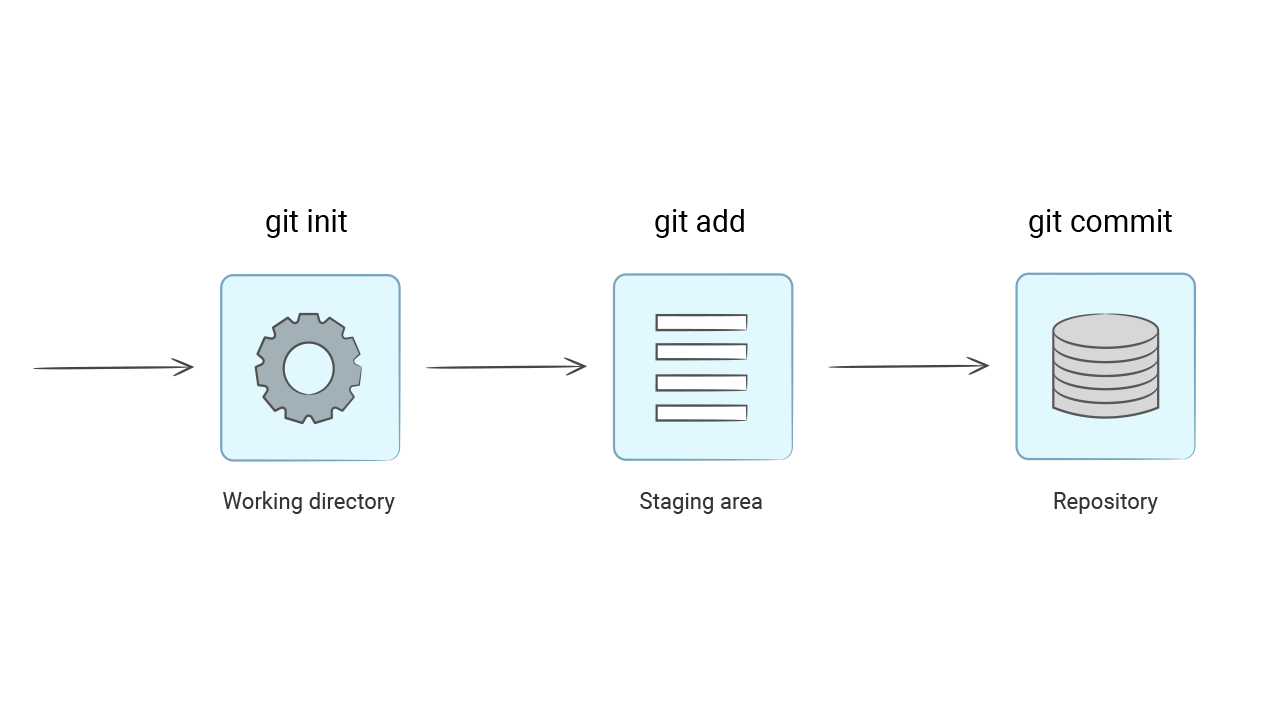
You might ask why it's so complicated, why do we need a separate index (a staging area where files go after git add), and why can't we add all the modified files to the commit at once? Oddly enough, this process was created for the convenience of programmers. The fact is that during development, many files may be added and changed. But that doesn't mean we want to add all these changes in one commit.
From a semantic point of view, a commit is a coherent and logically completed change within a project. It can be something very small, such as correcting a typo in a single file, and sometimes something large, such as when a new function is introduced. The main thing about a commit is its atomicity, i.e., it must perform exactly one task.
The README.md file is now inside the repository. You can verify this by running the git status command:
git status does not output files that have been added to the repository and do not contain changes. The README.md file itself is located inside the hexlet-git directory.